

News and improvements in 4human TQM

News and improvements in 4human TQM : Better document preview and more flexible event handling
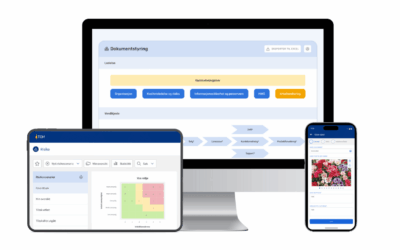
IN 4human TQM We are continuously working to make quality management simpler, more transparent and more adapted to everyday business. In our last webinar, we presented two important improvements in the document and event module, as well as a glimpse of what is coming next. Here is a summary of the news.
Document preview – more control, better user experience
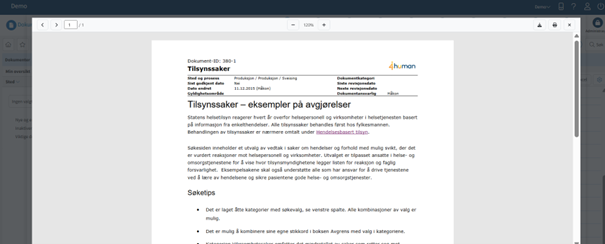
One of the biggest improvements in the document module is expanded support for document previews . The goal is to give users quick access to the right information – without unnecessary downloads.
Important recommendation:
For best functionality, documents should be uploaded as Word files , not PDFs. When documents are uploaded as PDFs directly in TQM , you lose the opportunity to:
- System-generated header and footer
- Preview option
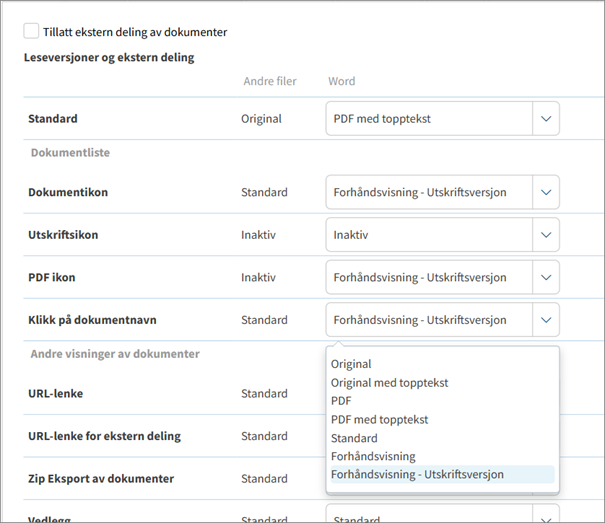
By using Word as a starting point, you as an administrator will be able to control:
- How documents are opened (preview, print, download)
- Which icons and clicks provide previews
- Manage read-only versions of attachments, documents on "My Page" and in the version archive
All settings are collected in one clear matrix in the administration module, so that the display can be controlled consistently across the solution.
Tip:
Avoid setting separate reader versions per document unless absolutely necessary. Such choices override top-level settings and can lead to unpredictable display.
The incident module: More flexible distribution of responsibilities
In the incident module, we have made several improvements that provide better overview and more flexibility in case processing. The feature was launched in 2025, but we find that not everyone has noticed it.
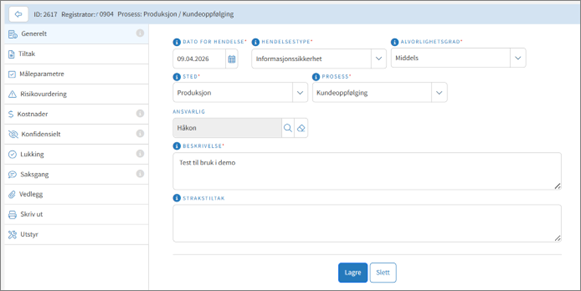
New option: Override process manager per incident:
- Register event on desired process
- The process manager, as the recipient of the incident, chooses whether the case should be assigned to another user in the system , regardless of role.
This provides greater flexibility in organizations where responsibilities do not always follow the process map.
At the same time, we have made it clearer for the end user who receives the case , already in the registration screen. The person responsible is displayed dynamically based on the selected process.
When the person responsible changes, this will be reflected in:
- Search results, printing and exporting
- Notifications and emails go to new person in charge
- All history is logged and can be tracked in the case
The process manager still has write access and can follow the case.
What happens next in 4human TQM ?
We are currently undertaking a major modernization of TQM , module by module. The event module will be the first step after the solution is migrated to AWS before the summer.
Among what's on the way:
- New module navigation in TQM
- Dynamic event schedules
– The customer creates their own templates for registration. For example, you can create a template for registering deviations , which consists of different fields compared to the template for improvement suggestions . - More flexible case management for both registrar and responsible person
- Better support for different types of events and workflows
We welcome input – especially regarding responsibilities, roles, and flexibility in the incident module. These are valuable contributions to further development.


The ultimate guide to ISO 9001: How to implement a quality management system
The ultimate guide to ISO 9001: How to implement a quality management system
Related posts
E-Book: 5 steps to a strong HSE culture
A strong HSE culture is not just about rules and routines – it is about people, commitment and leadership. With 4human TQM ...

How to succeed with incident management
Health, safety and environment (HSE) is a central part of any business – regardless of industry. One of the most important components of...
This is new in 4human TQM
This is new in 4human TQM 2025 We are pleased to present a number of exciting news and improvements in 4human TQM ! This...